1. Overview of WRF Cloud
The WRF Cloud framework is a cloud-based forecasting system that was designed to easily facilitate cost-effective state-of-the-art numerical weather prediction system forecasts in communities that lack the large computational resources.
1.1. Purpose and organization of the User’s Guide
The goal of this User’s Guide is to document the procedures required to install the WRF Cloud framework and to serve as a reference for using and adapting the system to an organization’s own needs. As features are added to the framework, this User’s Guide will continue to be expanded to document new capabilities.
The User Guide is organized by first providing an overview of the system, followed steps to install the framework and adminstartion details to manage the system. Finally the user interface is documented along with details about the graphical outputs produced by the system.
1.2. UCAR/UCP/COMET and UCAR/NCAR/RAL
This project is made possible by UCAR/UCP/COMET and collaborations with UCAR/NCAR/RAL/MMM.
1.3. WRF Cloud goals and design philosophy
The primary goal of this projec is to provide easy access to powerful NWP forecasts to communities lacking financial or computation resources to maintain baremetal forecasting platforms. The aim for this framework is to be:
Flexibility and customizable
Efficeint and cost-effective
Easy to setup, use, and manage
Useful and accessible
1.4. WRF Cloud components
The WRF Cloud framework primarily consists of a web application and a python package that were developed to orchestrate all of the necessary components of the end-to-end system from the web application to the user authentication and authorization, as well as the numerical weather software and forecast mangement. It leverages serverless architure, meaning that there are no dedicated webservers required to host the APIs, website or database, and makes running the system more cost-efficient. Amazon Web Services (AWS) is used for the cloud service provider and several AWS resources are used to construct the entire system.
1.4.1. System overview
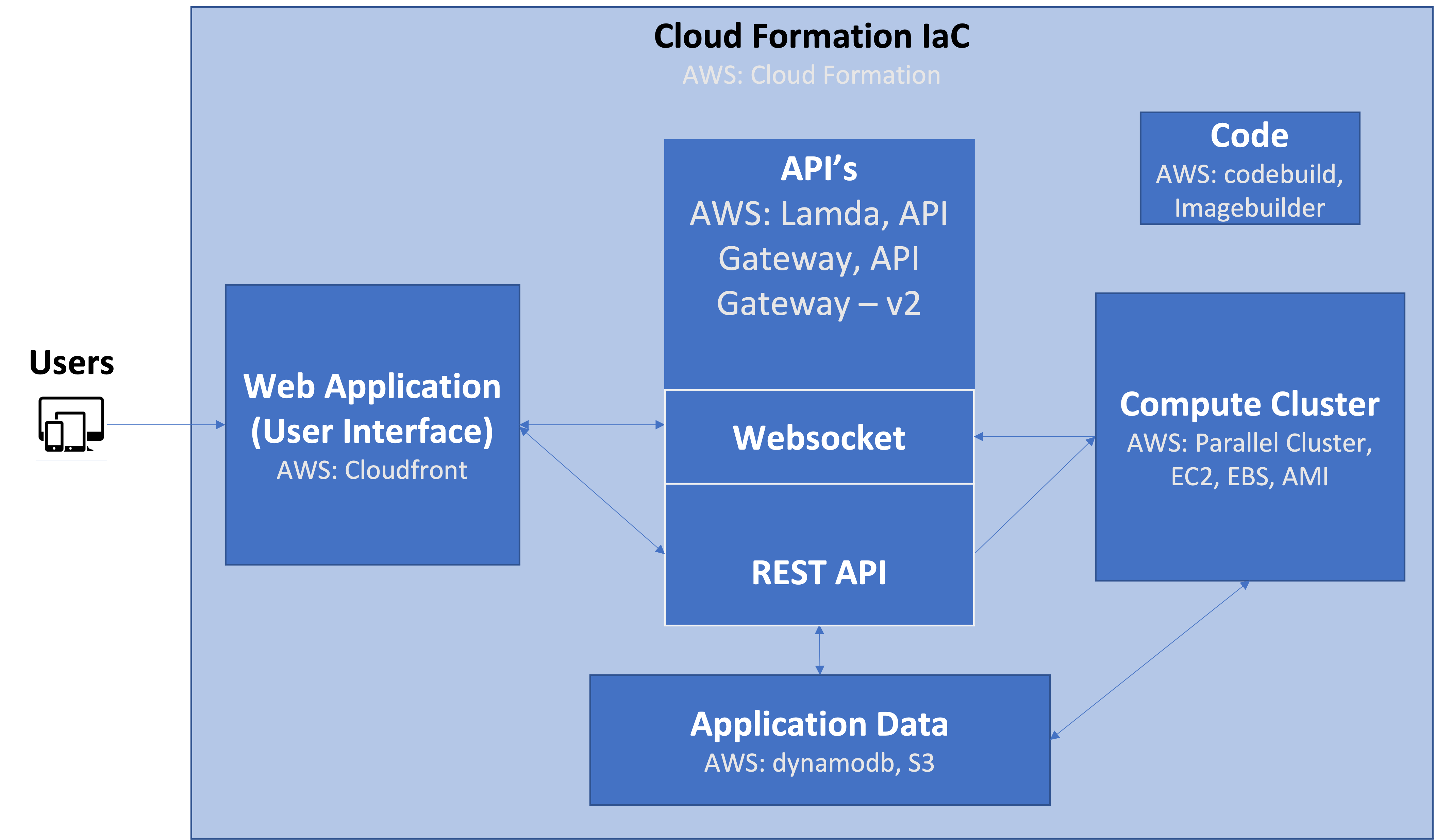
The main components of the framework and how they interact with eachother are shown in the overview schematic below. Details about each of the components follows.
1.4.2. Cloud Formation
AWS’s Cloud Formation is used to configure and manage all AWS resources by treating them as Infastructure as Code (IAC).
1.4.3. Web Application (User Interface)
The web application consists of single page application and progressive web applicaton and is the primary place users interact with the system. The website itself was implemented using Angular, and AWS’s Cloudfront is used to deliver the website content anywhere with low latency. The web application communicates with the APIs and allows users to login and change or recover passwords, manage users, as well as forecasts including launching, monitoring, cancelling new runs and viewing forecast output. In addiition, the web application was implemented with responsive design to support mobile devices, such as tablets and smartphones.
1.4.4. APIs
The application interfaces leverage AWS’s Lambda functions for the code execution and API Gateway to provide a standard HTTP request and forward to the Lambda function for processing, plust API Gateway version 2 to handle the websocket protocol) Together these three services coordinate a user’s request from the web application or user interface and performs authentication and execution of the requested action.
1.4.5. Compute Cluster
The compute cluster component is where the bulk of the computing is done, including running the numerical weather prediction software and producing the graphical outputs. Care is taken to ensure these resoureces are only provisioned when necessary and that they are shut down when the jobs are complete as this component is the most expensive part of the framework. AWS’s Parallel Cluster is used to deploy and manage the cluster resources which include launching an AWS EC2 instance from an AMI developed specifically for this framework.
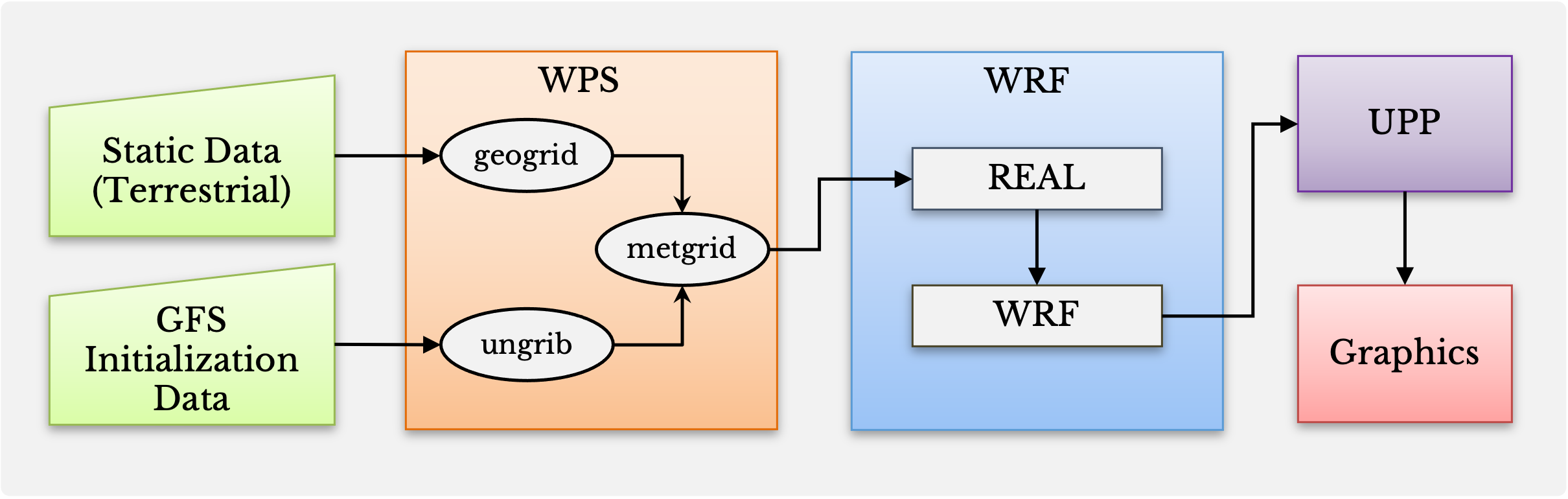
The weather forecasts use initial conditions from the Global Forecast System (GFS) and are pulled from AWS’s S3 on demand for each forecast. The numrical weather prediction software used for making the forecasts is the Weather Research and Modeling version 4.4.1 (WRF) system, including it’s pre-processor WPS. The WRF model output is then post-processed using the Unified Post Processor version 4.0.1 (UPP) and from there the data are processed for plotting and served up to the system’s website. The components of the numerical weather prediction part of the framework for shown in the schematic below.
1.4.6. Application Data
Certain information needs to persist for the system to function properly. This component uses AWS’s dynamodb service to maintain its docuement database. Information that is collected and stored falls into four categories: Users, Audit Log, WRF Jobs, Model Data, and Scheduled Jobs. Users information stored includes that which is required for authentication and authorization with the API. The Audit Log contains useful information about actions requested. The WRF Jobs category contains information about a certain forecast that was run, such as the intialization time, configuration name, user email, forecast length, status, archive location, and deletion information. Model data consists of the forecast output, graphics, and any other products desired to archive. Finally, Scheduled Jobs includes information from regulary scheduled jobs much like the WRF Jobs, but also including scheduling information.
1.4.7. Code
The python code used to build and manage the entire system is available on GitHub. AWS’s CodeBuild has been incorpoarted to make sure the code within the package is regularly tested with converage reports generated to identify untested features.
AWS’s Imagebuilder is used to create an Amazon Machine Image (AMI) that contains the hardware and software needed to run the system. This AMI is automatically created during the setup of this system.
1.5. WRF Cloud Release Notes
When applicable, release notes are followed by the GitHub issue number which describes the bugfix, enhancement, or new feature (WRF Cloud GitHub issues). Important issues are listed in bold for emphasis.
1.5.1. WRF Cloud Version 0.1.0 release notes (20220930)
1.6. Future development plans
New features being considered for future releases:
Verification capabilities
Enhanced User Interface plotting features
New plot types, e.g. vertical cross sections and Skew T - Log P plots
Increased customizabilitiy of configuration
1.7. Code support
At this time, support beyond the contents of this User’s Guide is available through established collaborations only. Please contact COMET for further inquiries.